NinePath is a daily horoscope and numerology app. It gives you one short reading a day, built from your birth date, your birth chart and today's Moon. The more you add, like your birth time and your full name at birth, the more personal your reading becomes.
Why use NinePath?
Every day, NinePath gives you one short reading about your day. It suggests how to approach your day, with at least one thing to do and one thing to avoid. You don't need to read several long horoscopes or work anything out yourself. Want to know why? You can tap to see the reasons.
- How to approach your day. You get one day type: Push, Connect, Recover or Careful. It comes with at least one thing to do and one thing to avoid.
- It's about you. Your reading starts from your own birth date and birth chart. You can open three parts: Your sky, You and Your numbers.
- See why. Tap "Why this guidance?" to see how your day type was chosen and which sky and number facts shaped the reading.
- Short, with more if you want it. Home shows a short reading you can read before your day starts. Tap Read more or open the three parts for detail.
- Worked out with care. NinePath does its own calculations for your numbers and birth chart. The planet positions for your chart are tested against NASA JPL data, as explained below.
What do you get each day?
Every day NinePath gives you one reading. It contains:
- A day type: Push, Connect, Recover or Careful.
- A short explanation in plain words.
- At least one Do and one Don't you can use today. Plus adds a second of each.
- "Why this guidance?", a sheet that shows the facts behind the reading, such as your Personal Day number and the Moon's sign.
The day type is a label for the day, not a score. It suggests a pace and leaves the choices to you. NinePath doesn't tell you what will happen. Astrology and numerology are offered as tools for reflection.
How does NinePath work out your reading?
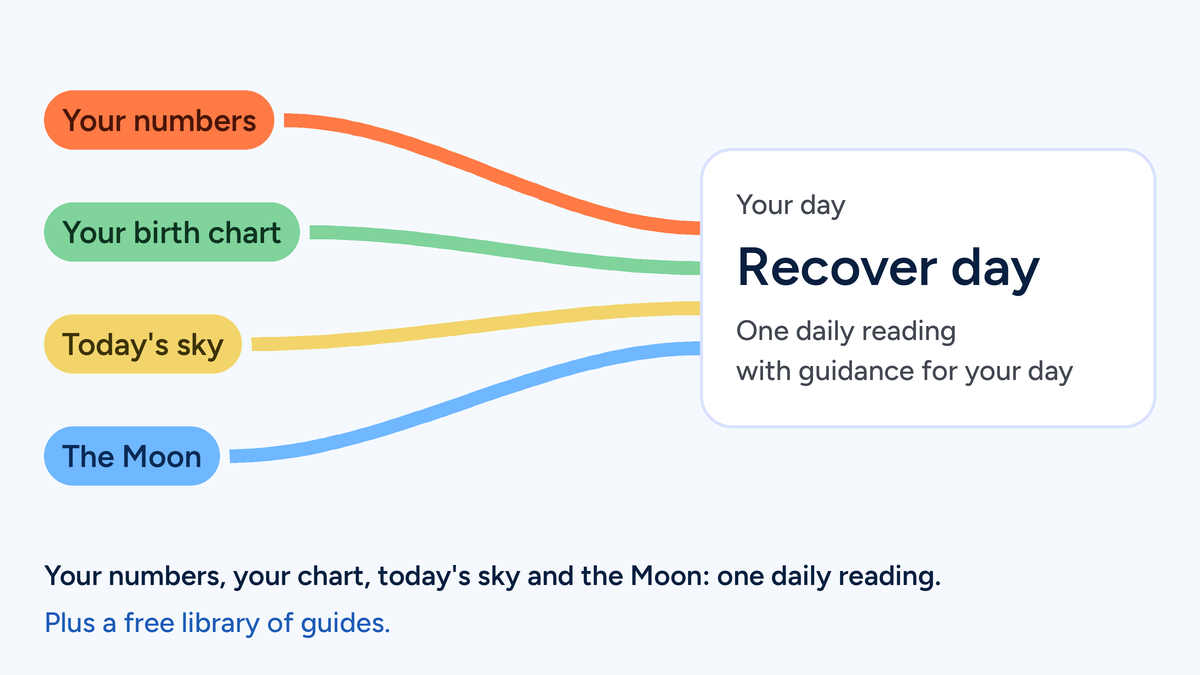
Your reading is calculated from your own birth details each day. NinePath runs its own calculations for each reading: your numbers, your birth chart, today's sky and the Moon. Each one is worked out separately on our own servers, using open-source astronomy software and our own formulas, rather than an outside astrology service. Your reading then brings the two sides together, so a number and a piece of your sky shape the same advice. When the Sun or a planet from Mars to Pluto makes a notable angle to your birth chart, NinePath shows one of them. It picks an angle that is exact today first, then the slower-moving planets, then angles to your Sun, Moon or Rising, then the one closest to exact. On days with none you see "A quiet sky today".
We test the Sun, Moon and planet positions used for our birth-chart calculations against data from NASA's JPL Horizons system. Across 36 dates from 1900 to 2039 they agree to within about a fiftieth of a degree (Pluto within a twentieth).
Where does the reading come from?
NinePath brings two sources together in one reading.
- Your numbers. Your Life Path number and your Personal Day, Month and Year numbers, worked out from your birth date.
- Your sky: your Sun and Moon signs, your Rising sign when your birth time and place are known and today's Moon.
Your day type comes from both sides: your Personal Day number and the element of today's Moon sign. Your daily reading then draws on your numbers and your sky together. On Home, your reading has three parts you can open: Your sky, You and Your numbers.
How NinePath works out your numbers
Your Life Path comes from the eight digits of your birth date, added and then reduced step by step. If a step lands on 11, 22 or 33, NinePath keeps it as a master number.
Your Personal Year starts from your birth month and day, added and reduced to one digit. NinePath adds the digits of the current year to that digit and reduces the total. Your Personal Month adds the current month's number, such as 10 for October, to your Personal Year. Your Personal Day adds today's day of the month, such as 19, to your Personal Month. Each level shows 11, 22 or 33 if it lands there, but only the reduced digit feeds the next level.
How NinePath reads your sky
NinePath uses the tropical zodiac. Your birth chart and the planets' positions for sky events are calculated with Astronomy Engine, an open-source library. Today's Moon sign and phase come from NinePath's own built-in lunar calculation. Only the sign is used for the day type.
When is a new reading made?
NinePath makes each day's reading shortly after midnight UTC. In Europe that is early morning, in the US it is the evening before and in Australia it is mid to late morning. The Personal Day and the Moon in your reading follow that UTC date. Your first reading, the Calendar and the numbers in your profile use your local date, so for a few hours a day the Calendar can show a different day type from your reading.
What else is in the app?
- Calendar shows the day types for today and the next six days, so you can see the shape of your week.
- You reflects your optional daily check-in: a few quick questions about how you feel today.
- One daily reminder, at a time you choose.
What is free and what does NinePath Plus add?
Today's reading is free. NinePath Plus adds the full explanation, a second Do and Don't, a 14-day day-type outlook, your past readings, a weekly recap and the houses of your birth chart. NinePath Plus is a paid plan. The app shows prices and terms before you buy.
Does NinePath have free guides?
Yes. NinePath also publishes a growing library of guides at ninepath.app/learn that explain astrology and numerology: the signs, life path numbers, the Moon, retrogrades and the methods behind them. Our aim is to build the most complete free library on astrology and numerology: guides you can come back to, free to read without an account and with their sources named.
Why does NinePath exist?
NinePath exists to help people feel ready for the day. It acts as a daily companion, bringing different perspectives together into brief, personal guidance. We want every day to start with guidance that feels like it was written for you. NinePath began with its founder's own search for guidance: separate astrology and numerology apps felt overwhelming, vague or impersonal to them.
Who is NinePath for?
NinePath is for adults aged 18 and over who want a short, personal start to the day. It is an app for iPhone and Android, in English. You can see your first reading before you create an account.
Questions people ask
Can NinePath tell me what will happen?
No. NinePath suggests a pace for the day and at least one Do and one Don't. It doesn't tell you what will happen and isn't medical, legal or financial advice.
Do I need my birth time?
No. Your numbers need only your birth date, as does your Sun sign unless you were born on the day the Sun changed sign; your Moon sign is shown when it is certain, otherwise you see both possible signs. Your Rising sign and houses need your birth time and place; NinePath doesn't fill in a default time such as noon.
Does the check-in change my reading?
Only the You part. The check-in is optional; your answers shape the You part of your reading. Your day type, explanation and Do and Don't stay the same.
Does NinePath use my name?
Only if you add it. If you add your optional full name at birth, NinePath works out two name numbers that can shape the wording of your daily explanation; the app doesn't show them. Adding your name doesn't change your day type, Life Path or Personal numbers.
Sources
- Wikipedia: Numerology. Numerology as the belief in a mystical relationship between a number and ideas.
- Wikipedia: Astrology. Astrology as reading meaning from the apparent positions of celestial objects.
- NASA JPL Horizons System. The solar system ephemeris data our planet tests compare against.